One event bus
40 typed events on one bus, filtered per sound or per overlapping instance.
hub.addEventListener(ENDED, next, { soundId: 'music' })
Sound manager for the web · TypeScript · Web Audio API
soundhub loads each sound once and keeps track of it for you. Play, fade, group, sprite, stream and place sounds in 3D, and follow every change on one typed event bus.
Four nature recordings from the demos, loaded and played by the real soundhub. Drag a strip to set its volume with setSoundVolume(). The waves behind this panel read the hub's master output.
What it does
40 typed events on one bus, filtered per sound or per overlapping instance.
hub.addEventListener(ENDED, next, { soundId: 'music' })
Every shot gets its own instance. A full group stops its oldest voice instead of piling up.
hub.createSoundGroup('lasers', { maxInstances: 8 })
One file, many sounds, each cut into its own buffer so it starts on the exact sample.
hub.playSprite('ui', 'click')
Place sounds around the ear, or move the ear through the scene for a first-person camera.
hub.setListenerPosition(player.x, 0, player.z)
An hour of audio plays without decoding it first, and still runs through the panner and the limiter.
await hub.loadStream('episode', url)
Artwork and media keys on the lock screen, and a limiter so many sounds at once cannot clip.
hub.setMediaSession('episode', { title })
Start in a minute
Change one import and your Howl code runs on soundhub. From there you can use what Howler does not have: music that ducks under a voice, footsteps that vary, interface sounds without files, and a hub that knows the state of every sound.
// was: import { Howl, Howler } from 'howler';
import { Howl, Howler } from 'soundhub/howler';

// The Howler code you have keeps running
const music = new Howl({ src: ['theme.mp3'], loop: true });
const voice = new Howl({ src: ['line.mp3'] });
music.play();

// What Howler cannot do is on Howler.hub
Howler.hub.duck(music.soundhubId, {
  when: voice.soundhubId,
  amount: 0.3,
});
voice.play();   // the music steps back
import { SoundHub, SoundEventsEnum } from 'soundhub';
const hub = new SoundHub({ masterLimiter: true });
await hub.loadSounds([
{ id: 'music', url: '/audio/theme.mp3' },
{ id: 'laser', url: '/audio/laser.wav' },
]);
hub.play('music', { loop: true, fadeInDuration: 2 });
hub.play('laser', { overlap: true });
// One bus, one place to react
hub.addEventListener(SoundEventsEnum.PROGRESS, (e) => {
seekBar.value = e.state!.progress;
}, { soundId: 'music' });import { SoundHub, SoundEventsEnum } from 'soundhub';
const hub = new SoundHub({ masterLimiter: true });
await hub.loadSounds([
{ id: 'music', url: '/audio/theme.mp3' },
{ id: 'laser', url: '/audio/laser.wav' },
]);
hub.play('music', { loop: true, fadeInDuration: 2 });
hub.play('laser', { overlap: true });
hub.addEventListener(SoundEventsEnum.PROGRESS, (e) => {
seekBar.value = e.state.progress;
}, { soundId: 'music' });<script type="module">
import { SoundHub } from
'https://cdn.jsdelivr.net/npm/soundhub/dist/soundhub.es.js';
const hub = new SoundHub();
await hub.loadSounds([{ id: 'click', url: '/sounds/click.mp3' }]);
hub.play('click');
</script>
<!-- Or as a plain script tag -->
<script src="https://cdn.jsdelivr.net/npm/soundhub/dist/soundhub.umd.js"></script>| Feature | soundhub | Howler.js 2.2.4 |
|---|---|---|
| Events | One typed bus, 40 types, a filter per listener | Callbacks per Howl |
| Progress | Full state on the event | Poll seek() yourself |
| Long files | loadStream, still in the Web Audio graph | html5: true, outside it |
| 3D on long files | Yes | No, HTML5 mode skips the panner |
| Voice limits | Groups with maxInstances | No cap on concurrent instances |
| Limiter | masterLimiter: true | Build it on Howler.ctx |
| Ducking | duck('music', { when: 'voice' }) | Fade by hand in onplay and onend |
| Variations | createVariations, with a pitch and volume spread | Pick a random sprite yourself |
| Sounds without files | soundhub/ui, and addBuffer for your own | Every sound needs a url |
Demos
Every control on these pages calls the library directly, with a console that shows the calls and the events as they happen.
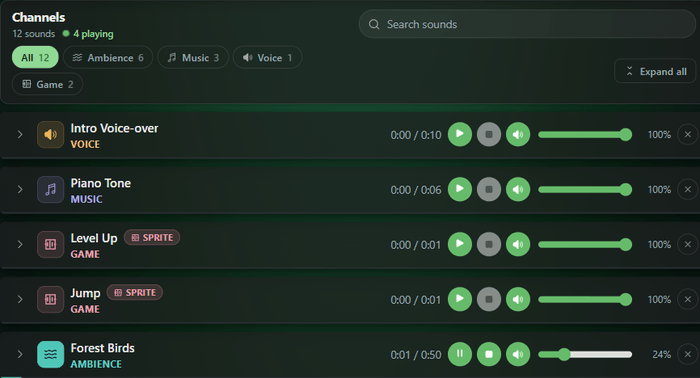 Twelve sounds, soundscapes in 3D, and every control on one page.
A sampled piano where every key starts its own instance.
Twelve sounds, soundscapes in 3D, and every control on one page.
A sampled piano where every key starts its own instance.
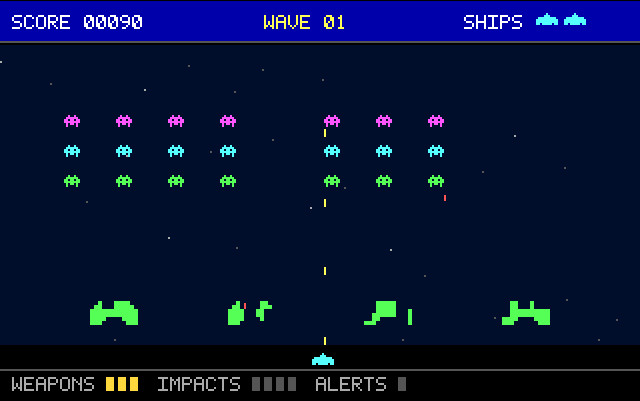 A small shooter on three groups, each with a voice limit.
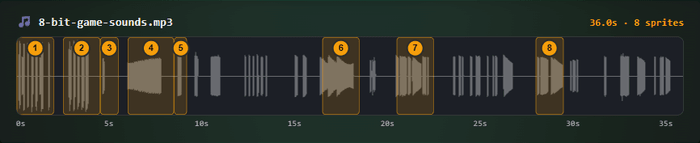 Jump, coin, power-up and victory, cut from one MP3.
Circle a sound around the listener and hear it move, on headphones or speakers.
Music that ducks under a voice, and footsteps that never play the same take twice in a row.
Twelve UI sounds rendered in the browser, so no audio files are needed. Heard inside a small app that uses them.
Change one import and your Howl code runs on soundhub.
The whole API on one page, in an editor you can change. Every card prints the calls behind your click, and an event log shows what came back. Fork it and try your own sounds.
Jump, coin, power-up and victory, cut from one MP3.
Circle a sound around the listener and hear it move, on headphones or speakers.
Music that ducks under a voice, and footsteps that never play the same take twice in a row.
Twelve UI sounds rendered in the browser, so no audio files are needed. Heard inside a small app that uses them.
Change one import and your Howl code runs on soundhub.
The whole API on one page, in an editor you can change. Every card prints the calls behind your click, and an event log shows what came back. Fork it and try your own sounds.
Where it comes from
My first sound engine was in ActionScript 3.0. This one went on npm in December 2024 as sound-manager-ts, and became soundhub in August 2026 with the same code under a new name.
A sound manager is the layer between your code and the browser audio system. It loads audio files once, keeps track of every sound that is playing, and gives you one place to start, stop, fade, pan or position them. Without one you end up writing that bookkeeping yourself in every project.
Yes. Each play call can create its own instance, so overlapping shots and explosions do not cut each other off, and sound groups let you cap how many instances a category may hold at once. Sound sprites keep dozens of short effects in a single file, which is the usual approach for web games.
The audio element plays one file at a time and gives you no control over panning, spatial position or grouping. soundhub.js runs on the Web Audio API, so the same sound can play many times at once, each with its own volume, pan and 3D position.
Yes. Mobile browsers keep audio suspended until the user interacts with the page, and the library resumes the audio context on that first gesture. It also mutes when the tab goes to the background and resumes on focus, which is what mobile users expect.
Yes. Change the import to soundhub/howler and existing Howl code runs on soundhub. Beyond what Howler does, soundhub ducks music under a voice, gives one name to several takes of a sound, ships interface sounds that need no files, keeps the state of every sound on one typed event bus, caps voices with sound groups, and keeps long streamed files inside the Web Audio graph, so 3D panning still works on them.
It is around 23 KB gzipped and has zero runtime dependencies. It ships as an ES module, a CommonJS build and a UMD build, with types for every TypeScript setup.